laravel-au maintained by eastpointlabs
laravel-au






Validate Australian business details in Laravel, check ABNs against the Australian Business Register, and add ready-made fields to Filament forms.
What it does
Catches bad details before they're saved. Rules for ABNs, ACNs, BSBs, phone numbers and postcodes, including whether a postcode belongs to the selected state.
use EastpointLabs\LaravelAu\Rules\Abn;
use EastpointLabs\LaravelAu\Rules\AuPhone;
use EastpointLabs\LaravelAu\Rules\AuPostcode;
use EastpointLabs\LaravelAu\Support\State;
use Illuminate\Validation\Rule;

$request->validate([
    'abn'      => ['required', new Abn],
    'phone'    => ['required', AuPhone::mobile()],
    'state'    => ['required', Rule::enum(State::class)],
    'postcode' => ['required', AuPostcode::matchingStateField('state')],
]);
Checks a business on the register. A valid checksum doesn't mean a business exists. With a
free GUID, the active ABN rule rejects an ABN that's cancelled or not on the
register, and can require GST registration. Abr gives you the business's
details in your own code.
use EastpointLabs\LaravelAu\Facades\Abr;
use EastpointLabs\LaravelAu\Rules\ActiveAbn;

$request->validate([
    'abn' => ['required', (new ActiveAbn)->requireGst()],
]);

Abr::abn('51 824 753 556')?->displayName(); // the business name, or null if not found or hidden
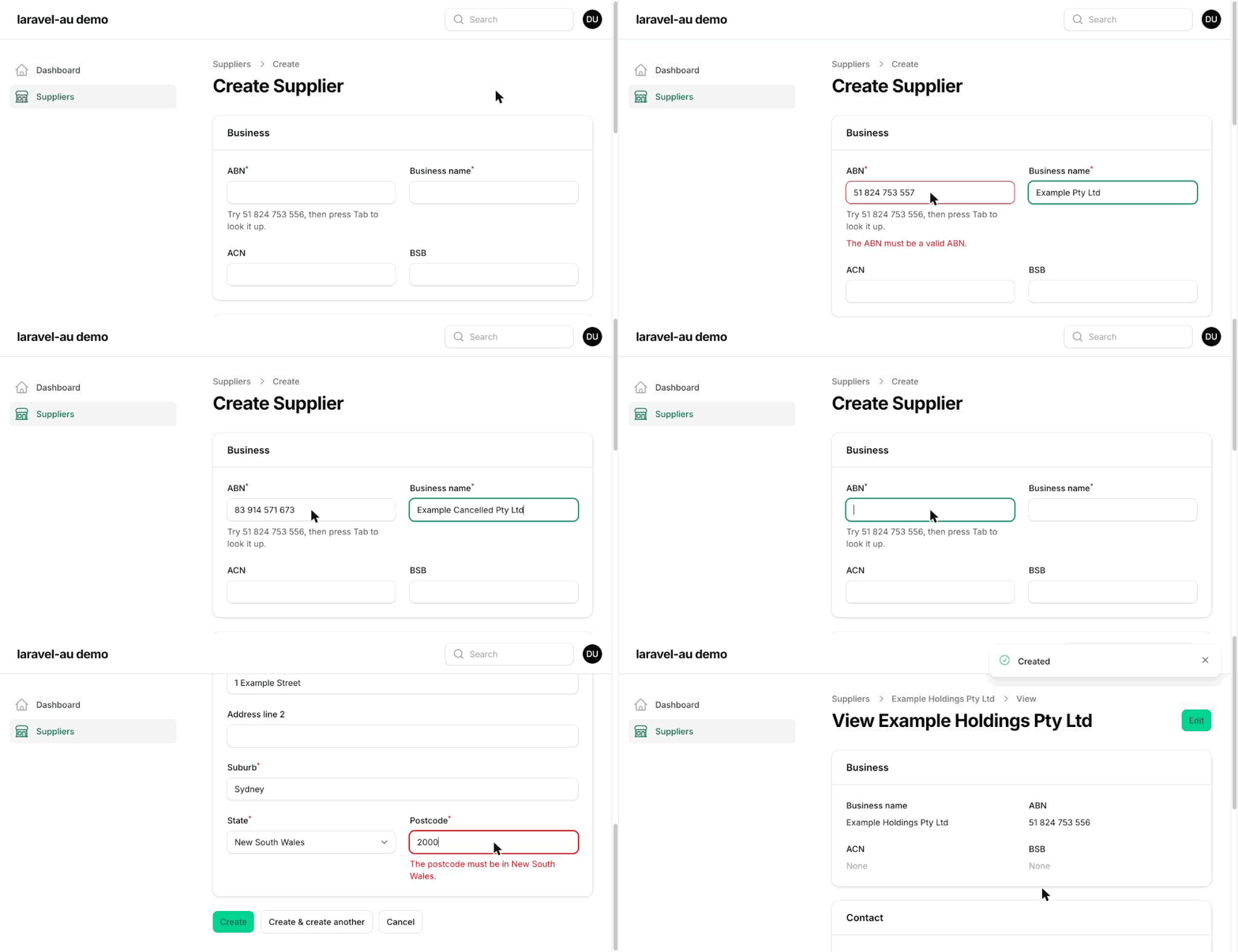
Adds Australian fields to Filament. Form fields format and validate as
people type. AbnInput can fill in the business name from the ABN, and AuAddressFields adds a
full address with the postcode checked against the state.
use EastpointLabs\LaravelAu\Filament\Forms\AbnInput;
use EastpointLabs\LaravelAu\Filament\Forms\AuAddressFields;
use Filament\Forms\Components\TextInput;

AbnInput::make('abn')->lookup('business_name'),
TextInput::make('business_name'),
AuAddressFields::make(),
It also includes value objects, Eloquent casts and a Faker provider for test data. Use what you need and ignore the rest.
Why
Almost every Australian Laravel project ends up rewriting the same helpers: an ABN checksum, a phone formatter, a postcode check. This package collects them in one well-tested place, with optional Filament form fields on top.
Requirements
- PHP 8.3+
- Laravel 12 or 13
- Filament 4 or 5 (optional, only for the form fields, table columns and infolist entries)
Installation
composer require eastpointlabs/laravel-au
Publish the config file if you want to change the defaults, and the translations if you want to change or translate the validation messages or Filament field labels:
php artisan vendor:publish --tag="au-config"
php artisan vendor:publish --tag="au-translations"
To use ABN Lookup, request a free GUID from the
Australian Business Register and add it to your
.env file:
ABR_GUID=your-guid-here
Configuration
Everything has a default, so you only need to publish config/au.php to change one. It has two
sections:
abr: the ABN Lookup GUID, timeout and caching, all set from.env. See Caching and settings.phone.store_as: whether phone numbers are saved in E.164 (e164, the default) or as national digits (national). The Eloquent cast and the Filament phone field both use it.
Usage
Validation rules
Each rule checks input with the matching value object described below, so it reads input the same way: an ABN typed with spaces passes, and one with a letter fails. Every rule comes as a rule object and as a string rule:
| Rule object | String rule | Passes |
|---|---|---|
new Abn |
abn |
a valid ABN |
new Acn |
acn |
a valid ACN |
new AbnOrAcn |
abn_or_acn |
a valid ABN (11 digits) or ACN (9 digits) |
new Bsb |
bsb |
a BSB with 6 digits |
new AuPhone |
au_phone |
a mobile or landline number |
new AuPostcode |
au_postcode |
a postcode in any state |
new ActiveAbn |
abn_active |
an active ABN, checked with ABN Lookup |
use EastpointLabs\LaravelAu\Rules\AbnOrAcn;
use EastpointLabs\LaravelAu\Rules\Bsb;

$request->validate([
    'supplier_number' => ['required', new AbnOrAcn],
    'bsb'             => ['nullable', new Bsb],
]);

// The same, with string rules
$request->validate([
    'supplier_number' => 'required|abn_or_acn',
    'bsb'             => 'nullable|bsb',
]);
The rule objects live in EastpointLabs\LaravelAu\Rules. Abn, Acn and Bsb share their
names with the value objects in EastpointLabs\LaravelAu\Support, so alias one if a file needs
both.
null passes, so pair each rule with required or nullable as you would any other. Values
that aren't strings, such as ints and arrays, fail.
Phone number rules
AuPhone allows mobiles and landlines by default. Use a named constructor, or pass the
PhoneType cases you want:
use EastpointLabs\LaravelAu\Rules\AuPhone;
use EastpointLabs\LaravelAu\Support\PhoneType;

new AuPhone;                                        // mobile or landline
AuPhone::mobile();                                  // mobile only
AuPhone::landline();                                // landline only
AuPhone::any();                                     // mobile, landline or service
new AuPhone(PhoneType::Mobile, PhoneType::Service); // mobile or service
The string rule takes the types as parameters: au_phone:mobile or
au_phone:mobile,landline,service. An unknown type throws an InvalidArgumentException,
because it's a mistake in your code rather than in the input. See
Mobiles, landlines and service numbers for how a
number's type is decided.
Postcode rules
AuPostcode passes a postcode from any state. Give it a state to require a postcode from that
state:
use EastpointLabs\LaravelAu\Rules\AuPostcode;
use EastpointLabs\LaravelAu\Support\State;

new AuPostcode;             // any state
new AuPostcode(State::NSW); // New South Wales only
new AuPostcode('NSW');      // the same: a state code or name, in any case
The string forms are au_postcode and au_postcode:NSW. With NSW as the state, 3000 fails
with "The postcode must be in New South Wales."
Only pass states from your own code, never user input. An unknown state string, such as
new AuPostcode('Atlantis'), throws an InvalidArgumentException, because it's treated as a
typo in your code rather than a validation failure. To check a state the user chose, use
matchingStateField().
Matching a postcode to the chosen state
There's no custom rule for state fields: use Laravel's Rule::enum(State::class). Then
AuPostcode::matchingStateField() checks the postcode against the state the user picked:
use EastpointLabs\LaravelAu\Rules\AuPostcode;
use EastpointLabs\LaravelAu\Support\State;
use Illuminate\Validation\Rule;

$request->validate([
    'state'    => ['required', Rule::enum(State::class)],
    'postcode' => ['required', AuPostcode::matchingStateField('state')],
]);
With state set to NSW, the postcode 2000 passes and 3000 fails with "The postcode must
be in New South Wales."
The state is read with State::fromLoose(), so a code or full name in any case works. An empty
or unrecognised state is ignored, and the postcode only has to be valid in some state, so the
rule never throws on user input. That's why the state field needs its own
Rule::enum(State::class): it's what reports a bad state.
In nested arrays, a field name without a dot is read from the sibling, so each address is checked against its own state:
$request->validate([
    'addresses.*.state'    => ['required', Rule::enum(State::class)],
    'addresses.*.postcode' => ['required', AuPostcode::matchingStateField('state')],
]);
Here addresses.0.postcode is checked against addresses.0.state. A field name with a dot,
such as matchingStateField('billing.state'), is an absolute path from the top of the data.
Active ABN rule
A checksum shows an ABN is well formed, not that the business exists. ActiveAbn checks that
the ABN is on the Australian Business Register and that its status is active. requireGst(),
or abn_active:gst, also requires it to be registered for GST:
use EastpointLabs\LaravelAu\Rules\ActiveAbn;

$request->validate([
    'abn' => ['required', (new ActiveAbn)->requireGst()],
]);

// The same, with a string rule
$request->validate([
    'abn' => 'required|abn_active:gst',
]);
With abn as the field, the rule fails with:
- "The abn must be a valid ABN." when the ABN is badly formatted. It isn't looked up.
- "The abn must be an active ABN." when the ABN isn't on the register, or isn't active.
- "The abn must be registered for GST." when it's active but not registered for GST, with
requireGst()orabn_active:gst.
A suppressed ABN is judged on its status like any other, so a suppressed ABN that's active
passes. null is left to required and nullable, as with the other rules.
The rule uses ABN Lookup, so it needs the ABR_GUID from
Installation.
When the ABN can't be checked, because no GUID is set, ABN Lookup can't be reached or times out,
or it answers with an error, the rule fails with "The abn could not be checked right now. Please
try again." It also logs a warning that names the exception class only, without the GUID or the
ABN. Failing is the safe default, because an unchecked ABN never gets through. Where letting
someone through matters more than the check, call passWhenUnavailable() to pass instead:
$request->validate([
    'abn' => ['required', (new ActiveAbn)->passWhenUnavailable()],
]);
The warning is still logged, and an ABN that's looked up and isn't active still fails. There's
no string rule form of passWhenUnavailable(), so use the rule object.
On a cache miss, the lookup is a network call made during validation, so it can add up to
ABR_TIMEOUT seconds (10 by default) to the response. Successful lookups are cached, for a day
by default, so checking the same ABN again is fast. Not-found results and errors aren't cached.
See Caching and settings. For forms, consider a lower timeout, such as
ABR_TIMEOUT=3, so a slow ABN Lookup doesn't keep people waiting. The timeout applies to every
lookup, not just this rule.
In tests, use Abr::fake() so no request is sent (see Testing your app).
An ABN you configure is active and not registered for GST unless you say otherwise:
use EastpointLabs\LaravelAu\Facades\Abr;
use EastpointLabs\LaravelAu\Rules\ActiveAbn;
use Illuminate\Support\Facades\Validator;

it('only accepts active ABNs', function (): void {
    Abr::fake([
        '51824753556' => [],
        '83914571673' => ['AbnStatus' => 'Cancelled'],
    ]);

    $rules = ['abn' => ['required', new ActiveAbn]];

    expect(Validator::make(['abn' => '51 824 753 556'], $rules)->passes())->toBeTrue()
        ->and(Validator::make(['abn' => '83 914 571 673'], $rules)->passes())->toBeFalse();
});
Set 'Gst' => '2000-07-01' on an ABN to make it registered for GST, and use
Abr::fake()->failing() to test what happens when the ABN can't be checked.
Messages
The messages are in Australian English, under the au::validation translation namespace. For
example, "The abn must be a valid ABN." and "The postcode must be in New South Wales."
To change them, publish the translations with the au-translations tag (see
Installation) and edit lang/vendor/au/en/validation.php. To translate them,
add the same file for another locale, such as lang/vendor/au/fr/validation.php.
For the string rules, your app's own messages win, as they do for Laravel's built-in rules: an
inline custom message, or a line keyed by the rule name (such as abn) in your app's
lang/en/validation.php. Your message replaces every message that rule can fail with, so a
line for abn_active also covers an ABN that couldn't be checked.
ABN, ACN and BSB
Abn, Acn and Bsb are immutable value objects. They accept a number the way people type
it, keep only the digits, and format it for display.
use EastpointLabs\LaravelAu\Support\Abn;

$abn = Abn::from('51 824 753 556');

$abn->value;                  // "51824753556"
$abn->format();               // "51 824 753 556"
(string) $abn;                // "51824753556"
json_encode(['abn' => $abn]); // {"abn":"51824753556"}
Store value, and use format() when you show the number to people. Input may contain spaces,
hyphens, dots and non-breaking spaces. Any other character, such as a letter or a tab, makes it
invalid.
Check or parse input with isValid(), tryFrom() or from():
Abn::isValid('51 824 753 556'); // true
Abn::isValid('51 824 753 557'); // false: bad checksum

Abn::tryFrom('51 824 753 557'); // null
Abn::from('51 824 753 557');    // throws InvalidValueException
tryFrom() returns null for null, blank or invalid input, so it suits optional fields.
from() throws EastpointLabs\LaravelAu\Exceptions\InvalidValueException, which extends
InvalidArgumentException. Its message never includes the input, which may be personal
information.
Two objects are equal when their digits match:
Abn::from('51824753556')->equals(Abn::from('51-824-753-556')); // true
Acn and Bsb work the same way:
use EastpointLabs\LaravelAu\Support\Acn;
use EastpointLabs\LaravelAu\Support\Bsb;

Acn::from('004085616')->format(); // "004 085 616"
Acn::isValid('000 000 018');      // false: bad check digit

Bsb::from('062000')->format();    // "062-000"
A BSB has no check digit, so Bsb only checks that there are six digits. It can't tell you
whether the branch exists.
Finding the ACN in an ABN
A company's ABN is usually two digits followed by its ACN. acn() returns that ACN when the
last nine digits form a valid one, and null otherwise:
Abn::from('53 004 085 616')->acn()?->format(); // "004 085 616"
Abn::from('51 824 753 556')->acn();            // null
This is a check-digit match, not a register lookup. It doesn't prove the ABN and ACN belong to the same company.
States and postcodes
State is a string-backed enum with one case for each state and mainland territory: NSW,
VIC, QLD, SA, WA, TAS, NT and ACT. Each case's value is its code, so it stores
as a short string and works with Laravel's enum cast and Rule::enum().
use EastpointLabs\LaravelAu\Support\State;

State::VIC->value;   // "VIC"
State::VIC->label(); // "Victoria"

State::options();    // ['NSW' => 'New South Wales', 'VIC' => 'Victoria', ...]
options() maps codes to labels in case order, ready for a select field.
To read a state the way people type it, use fromLoose(). It matches a code or full name in
any case, ignores surrounding whitespace and allows one trailing dot. It returns null for
null, blank or unknown input.
State::fromLoose('nsw');             // State::NSW
State::fromLoose('New South Wales'); // State::NSW
State::fromLoose(' Vic. ');          // State::VIC
State::fromLoose('New Zealand');     // null
Postcode is a value object that works like Abn, with from(), tryFrom(), isValid(),
value, format() and equals(). It also knows which state it belongs to. The value is a
string, so leading zeros are kept.
use EastpointLabs\LaravelAu\Support\Postcode;
use EastpointLabs\LaravelAu\Support\State;

$postcode = Postcode::from('0800');

$postcode->value;                       // "0800"
$postcode->format();                    // "0800"
(string) $postcode;                     // "0800"
json_encode(['postcode' => $postcode]); // {"postcode":"0800"}

$postcode->state();               // State::NT
$postcode->belongsTo(State::NT);  // true
$postcode->belongsTo(State::QLD); // false
belongsTo() checks a postcode against a state. To do this in form validation, use
AuPostcode::matchingStateField().
A postcode is valid when it has exactly 4 digits and falls in a state's postcode range. Surrounding whitespace is ignored, including non-breaking spaces. Anything else, such as a space inside the number, makes it invalid.
Postcode::isValid('2600'); // true
Postcode::isValid('800');  // false: needs all 4 digits
Postcode::isValid('0500'); // false: in no state's range

Postcode::tryFrom('800');  // null
Postcode::from('800');     // throws InvalidValueException
The ranges show a postcode is plausible, not that it exists, so a valid Postcode may not be
in use. Jervis Bay (2540) and Norfolk Island (2899) fall inside NSW ranges, so they count as
NSW.
Finding the state for a postcode
State::fromPostcode() returns the state for a postcode, or null when it's in no state's
range. A string follows the same rules as Postcode. An int can't hold a leading zero, so
it's zero-padded to 4 digits.
State::fromPostcode('2000'); // State::NSW
State::fromPostcode('0800'); // State::NT
State::fromPostcode('800');  // null: a string needs all 4 digits
State::fromPostcode(800);    // State::NT: read as "0800"
State::fromPostcode(10000);  // null
Don't write the leading zero in an int. PHP reads an int literal that starts with 0 as
octal: 0200 is 128, which is in no state's range, and 0800 is a parse error. Pass the
string '0800' or the int 800 instead.
postcodeRanges() returns a state's inclusive ranges as ints, so 200 means 0200:
State::ACT->postcodeRanges(); // [[200, 299], [2600, 2618], [2900, 2920]]
Phone numbers
PhoneNumber is a value object for Australian mobile, landline and service (13, 1300 and 1800)
numbers. It works like Abn, with from(), tryFrom(), isValid(), value, format() and
equals(). The examples below use numbers that the Australian Communications and Media
Authority (ACMA) reserves for use in fiction.
use EastpointLabs\LaravelAu\Support\PhoneNumber;

$phone = PhoneNumber::from('+61 491 570 156');

$phone->value;                    // "0491570156"
$phone->format();                 // "0491 570 156"
$phone->formatInternational();    // "+61 491 570 156"
$phone->toE164();                 // "+61491570156"
(string) $phone;                  // "0491570156"
json_encode(['phone' => $phone]); // {"phone":"0491570156"}
value holds the national digits, so a number is stored the same way however it was typed.
Use format() to show it to people in Australia and formatInternational() for people
overseas. toE164() gives the compact international form that SMS and calling services
usually expect.
Input may contain spaces, hyphens, dots, parentheses and non-breaking spaces. A leading +61
or 61 becomes the trunk 0, and the +61 (0) form works too. Numbers from other countries
are rejected, and any other character, such as a letter or a tab, makes the input invalid.
PhoneNumber::isValid('0491-570-156');       // true
PhoneNumber::isValid('+61 (0)2 5550 1234'); // true
PhoneNumber::isValid('0491 570 15');        // false: too few digits

PhoneNumber::tryFrom('0491 570 15'); // null
PhoneNumber::from('0491 570 15');    // throws InvalidValueException
Two numbers are equal when their national digits match:
PhoneNumber::from('0491-570-156')->equals(PhoneNumber::from('+61 (0)491 570 156')); // true
Mobiles, landlines and service numbers
The leading digits decide the type. A mobile starts with 04 and a landline with 02, 03,
07 or 08, and both have 10 digits. A service number is 1300 or 1800 followed by 6
digits, or 13 followed by 4.
type() returns a PhoneType, a string-backed enum with the cases Mobile ('mobile'),
Landline ('landline') and Service ('service'). isMobile(), isLandline() and
isService() are shortcuts for the same check.
use EastpointLabs\LaravelAu\Support\PhoneNumber;
use EastpointLabs\LaravelAu\Support\PhoneType;

$landline = PhoneNumber::from('03 5550 1234');

$landline->type() === PhoneType::Landline; // true
$landline->isLandline();                   // true
$landline->areaCode();                     // "03"
$landline->format();                       // "(03) 5550 1234"
$landline->formatInternational();          // "+61 3 5550 1234"
areaCode() returns "02", "03", "07" or "08" for a landline, and null for anything
else.
Service numbers can't be dialled from overseas, so toE164() and formatInternational()
return null for them:
$service = PhoneNumber::from('1800 160 401');

$service->isService();           // true
$service->format();              // "1800 160 401"
$service->toE164();              // null
$service->formatInternational(); // null

PhoneNumber::from('1300-975-707')->format(); // "1300 975 707"
PhoneNumber::from('13 1234')->format();      // "13 12 34"
Eloquent casts
The casts store a value object's canonical string in the database and give you the value object
back when you read the attribute. State doesn't need a cast from the package: it's a
string-backed enum, so Laravel's enum cast handles it.
use EastpointLabs\LaravelAu\Casts\AsAbn;
use EastpointLabs\LaravelAu\Casts\AsAcn;
use EastpointLabs\LaravelAu\Casts\AsBsb;
use EastpointLabs\LaravelAu\Casts\AsPhoneNumber;
use EastpointLabs\LaravelAu\Casts\AsPostcode;
use EastpointLabs\LaravelAu\Support\State;
use Illuminate\Database\Eloquent\Model;

class Supplier extends Model
{
    protected function casts(): array
    {
        return [
            'abn'      => AsAbn::class,
            'acn'      => AsAcn::class,
            'bsb'      => AsBsb::class,
            'phone'    => AsPhoneNumber::class,
            'postcode' => AsPostcode::class,
            'state'    => State::class, // Laravel's enum cast
        ];
    }
}
Set an attribute to a value object, or to a string in any form its from() accepts. The cast
stores the canonical value, and null stores null. Reading gives back the value object, and
a stored null reads as null:
use EastpointLabs\LaravelAu\Support\Postcode;

$supplier = new Supplier;

$supplier->abn = '51 824 753 556';            // stored as "51824753556"
$supplier->postcode = Postcode::from('0800'); // stored as "0800"
$supplier->acn = null;                        // stored as null

$supplier->abn->format(); // "51 824 753 556"
$supplier->acn;           // null

$supplier->toArray(); // ['abn' => '51824753556', 'postcode' => '0800', 'acn' => null]
toArray() and toJson() hold the stored strings, not objects, so an API response shows the
same values as the database.
A row stored in another form, such as an ABN saved with spaces before you added the cast, reads normally and isn't marked as changed just because you read it. It's stored in canonical form the next time you set that attribute.
Setting an invalid value throws InvalidValueException, as from() does. Check input with the
validation rules first, so people see a message rather than an error.
Reading a stored value that isn't valid throws too, as Laravel's enum cast does for a value
that isn't a case. Clean up existing data before you add a cast to a column that already has
rows.
Use string columns. ACNs, BSBs, postcodes and national phone numbers can start with 0, which
an integer column drops. A stored integer is read as its digits, so an ABN in an integer column
still works, but an ACN that has lost its leading zeros isn't valid and throws.
Storing phone numbers
AsPhoneNumber stores numbers in E.164, such as +61491570006, by default. Set
phone.store_as in config/au.php to national to store national digits (0491570006)
instead. The Filament phone field uses the same setting, so the two agree.
Service numbers have no E.164 form, so they're always stored as national digits.
$supplier->phone = '0491 570 006'; // stored as "+61491570006"

$supplier->phone->value;    // "0491570006"
$supplier->phone->format(); // "0491 570 006"

$supplier->phone = '1300 975 707'; // stored as "1300975707"
The cast reads either form back as the same PhoneNumber, so rows stored before you change the
setting still load. toArray() and toJson() follow the setting too, so a phone number appears
as +61491570006 by default. That differs from json_encode() on a PhoneNumber itself, which
gives the national digits.
Faker provider
When Faker is installed, the package adds an Australian provider to Laravel's Faker generator,
so fake()->abn() and friends work in model factories and tests. Most Laravel apps already
have fakerphp/faker as a dev dependency. This package doesn't need it: without Faker, the
provider just isn't registered.
use Illuminate\Database\Eloquent\Factories\Factory;

class SupplierFactory extends Factory
{
    public function definition(): array
    {
        return [
            'abn'      => fake()->abn(),
            'acn'      => fake()->acn(),
            'bsb'      => fake()->bsb(),
            'phone'    => fake()->auMobileNumber(),
            'state'    => $state = fake()->auState(),
            'postcode' => fake()->auPostcode($state), // in the state picked above
        ];
    }
}
The provider adds these methods:
abn(): 11 digits with a valid checksum.invalidAbn(): 11 digits that fail the ABN checksum, for testing your validation.acn(): 9 digits with a valid check digit.bsb(): any 6 digits, which is allBsbchecks.auMobileNumber(): one of six mobile numbers ACMA reserves for fiction, such as0491570156.auLandlineNumber(?State $state = null): a number from ACMA's fictional5550block, in the state's area code.auLandlineNumber(State::VIC)gives035550and four more digits.auPostcode(?State $state = null): a postcode inside one of the state's ranges, soState::fromPostcode()returns that state.auState(): aStatecase.
Without a state, auLandlineNumber() and auPostcode() pick one at random.
Values are canonical digit strings, like a value object's value, and auState() returns a
State. To show one formatted, pass it to the value object:
use EastpointLabs\LaravelAu\Support\PhoneNumber;
use EastpointLabs\LaravelAu\Support\State;

PhoneNumber::from(fake()->auLandlineNumber(State::VIC))->format(); // such as "(03) 5550 1234"
Seed Faker, such as with fake()->seed(1234), to get the same values on every run.
Warning: generated ABNs and ACNs pass the checks, but they may belong to real businesses. Never send them to the live ABN Lookup service. In tests, use
Abr::fake()instead (see Testing your app). The phone numbers all come from the ranges ACMA reserves for fiction, so they're safe to use.
ABN Lookup
Abr looks up businesses on the Australian Business Register through its free ABN Lookup web
services. It needs the ABR_GUID from Installation, and so does the
active ABN rule. The other validation rules and the value objects don't, so
you can skip the GUID if those are all you use.
use EastpointLabs\LaravelAu\Facades\Abr;

Abr::abn('51 824 753 556');            // ?AbnDetails
Abr::acn('004 085 616');               // ?AbnDetails for the company's ABN
Abr::searchByName('Example Holdings'); // list<NameMatch>

Abr::searchByName('Example Holdings', maxResults: 20);
abn() and acn() take a string in any form the value objects accept, or an Abn or Acn
object. searchByName() searches entity, business and trading names, and returns the matches
in the order ABN Lookup ranks them. maxResults defaults to 10 and is kept between 1 and 200
(AbrClient::MAX_RESULTS).
In application code, inject the LooksUpAbns contract instead of using the facade. It resolves
to the same client, and in tests Abr::fake() replaces it (see
Testing your app).
use EastpointLabs\LaravelAu\Abr\Contracts\LooksUpAbns;

final class SupplierCheck
{
    public function __construct(private LooksUpAbns $abr) {}

    public function isActive(string $abn): bool
    {
        return $this->abr->abn($abn)?->isActive() ?? false;
    }
}
Reading the results
abn() and acn() return null when the number isn't on the register, so check for it first:
$details = Abr::abn('51 824 753 556');

if ($details !== null) {
    $details->displayName();     // ?string: the first business name, else the entity name
    $details->isActive();        // bool: the status is "Active"
    $details->isGstRegistered(); // bool
    $details->isSuppressed();    // bool
}
AbnDetails also holds the register's fields as properties: abn, acn, status,
statusEffectiveFrom, entityName, entityTypeCode, entityTypeName, businessNames,
gstRegisteredFrom, postcode and state. Numbers are value objects, dates are
DateTimeImmutable and the state is a State. toArray() returns them all as plain values.
An ABN holder can ask the register to suppress their details. A suppressed ABN still returns
AbnDetails, with its status and GST registration, but no names or address. isSuppressed()
is then true and displayName() returns null, so don't assume there's always a name to
show.
Each name search result is a NameMatch:
foreach (Abr::searchByName('Example Holdings') as $match) {
    $match->abn;       // Abn
    $match->name;      // string: the name that matched
    $match->nameType;  // string, such as "Entity Name" or "Business Name"
    $match->state;     // ?State
    $match->postcode;  // ?Postcode
    $match->score;     // int: higher is a closer match
    $match->isCurrent; // bool
}
Errors
null means the ABN or ACN wasn't found. Other problems throw:
- An invalid ABN or ACN throws
InvalidValueException, and an empty name throwsInvalidArgumentException. Both are thrown before any request is sent. AbrExceptionmeans the lookup failed: the connection failed or timed out, ABN Lookup answered with an HTTP error status or a response that couldn't be read, or it reported an error of its own, such as an unrecognised GUID.MissingGuidExceptionmeans no GUID is set. It's thrown when you call a lookup, not when the app boots. It extendsAbrException, so catchingAbrExceptionhandles both.
The package's exceptions live in EastpointLabs\LaravelAu\Exceptions. Failed requests aren't
retried. If you need retries, add them where you make the call, such as in a queued job.
Caching and settings
Successful abn() and acn() lookups are cached for a day by default, so looking up the same
number again sends no request. Not-found results, errors and name searches aren't cached.
The trade-off is that a cached result can be out of date: an ABN cancelled after it was cached
still shows as active until the entry expires. Lower ABR_CACHE_TTL, or turn caching off,
where that matters.
To change the defaults, set these in your .env file:
| Setting | Default | Purpose |
|---|---|---|
ABR_TIMEOUT |
10 |
Request timeout, in seconds |
ABR_CACHE_ENABLED |
true |
Set to false to turn caching off |
ABR_CACHE_STORE |
your app's default store | The cache store to use, such as redis |
ABR_CACHE_TTL |
86400 (one day) |
How long to keep a lookup, in seconds |
ABR_BASE_URL |
https://abr.business.gov.au/json |
The ABN Lookup address |
Keeping the GUID private
The GUID never appears in the package's exception messages, stack trace arguments or cache
keys. ABN Lookup takes it as a query parameter, though, so anything that sees the request URL
sees the GUID. That includes tools that record outgoing HTTP requests, such as Laravel
Telescope, and the error Laravel throws for an unfaked request after
Http::preventStrayRequests(). In tests, use Abr::fake() so no request
is made.
Testing your app
Abr::fake() replaces ABN Lookup with a fake for the rest of the test. The fake answers from
details you give it and never sends a request. It's bound to the LooksUpAbns contract, so
code that injects the contract gets it too, not just code that uses the facade.
This test checks the SupplierCheck class from above:
use EastpointLabs\LaravelAu\Facades\Abr;

it('only accepts active suppliers', function (): void {
    Abr::fake([
        '51824753556' => ['EntityName' => 'Example Holdings Pty Ltd'],
        '83914571673' => ['AbnStatus' => 'Cancelled'],
    ]);

    $check = app(SupplierCheck::class);

    expect($check->isActive('51 824 753 556'))->toBeTrue()
        ->and($check->isActive('83 914 571 673'))->toBeFalse();

    Abr::assertLookedUp('51 824 753 556');
    Abr::assertLookupCount(2);
});
Each key is an ABN. Each value is an AbnDetails object, or an array of ABN Lookup fields,
such as EntityName, AbnStatus and Acn, merged over an active record for that ABN. acn()
finds configured details by their Acn field, so set 'Acn' => '004085616' on
53 004 085 616 to look that company up by its ACN.
An ABN or ACN you haven't configured returns null, and a name search returns no matches.
After preventStrayLookups(), an unconfigured ABN or ACN throws a RuntimeException instead,
so a test can't pass by accident. It isn't an AbrException, so code that handles ABN Lookup
errors won't hide it.
Input is checked like the real client checks it, so an invalid ABN or ACN still throws
InvalidValueException.
These methods set up other answers. Each returns the fake, so they chain:
notFound(...$abns): these ABNs returnnull, even afterpreventStrayLookups().suppressed($abn, $status = 'Active', $gst = false): this ABN returns suppressed details, with a status and GST registration but no names or address.withNameMatches($matches): whatsearchByName()returns, whatever the name. Each match is aNameMatch, or an array with the keysAbn,Name,NameType,State,Postcode,ScoreandIsCurrent.failing(): every lookup throwsAbrException, for testing your error handling.
Abr::fake(['51824753556' => ['EntityName' => 'Example Holdings Pty Ltd']])
    ->suppressed('83 914 571 673', status: 'Cancelled')
    ->notFound('53 004 085 616')
    ->preventStrayLookups();
Assert on the lookups through the facade, or on the fake that Abr::fake() returns:
assertLookedUp($abn)andassertNotLookedUp($abn): whetherabn()was called with this ABN. Onlyabn()calls count.assertNothingLookedUp(): noabn(),acn()orsearchByName()call was made.assertLookupCount($count): how manyabn(),acn()andsearchByName()calls were made in all, including repeats.
Filament fields
If your app uses Filament 4 or 5, these form fields bring the package's validation, formatting and ABN Lookup into your forms. Filament is optional: the package doesn't require it, and everything else works without it. The fields are building blocks for your own resource forms. The package adds no pages, resources or plugin, so there's nothing to register.
use EastpointLabs\LaravelAu\Filament\Forms\AbnInput;
use EastpointLabs\LaravelAu\Filament\Forms\AcnInput;
use EastpointLabs\LaravelAu\Filament\Forms\AuAddressFields;
use EastpointLabs\LaravelAu\Filament\Forms\AuPhoneInput;
use EastpointLabs\LaravelAu\Filament\Forms\BsbInput;
use Filament\Forms\Components\TextInput;
use Filament\Schemas\Schema;

public static function form(Schema $schema): Schema
{
    return $schema->components([
        AbnInput::make('abn')->lookup('business_name'),
        TextInput::make('business_name'),
        AcnInput::make('acn'),
        BsbInput::make('bsb'),
        AuPhoneInput::make('phone')->mobileOnly(),
        AuAddressFields::make('billing_'),
    ]);
}
The fields live in EastpointLabs\LaravelAu\Filament\Forms, and each one works with just
make():
AbnInputis masked as51 824 753 556, checked with theAbnrule and saved as 11 digits.AcnInputis masked as004 085 616, checked with theAcnrule and saved as 9 digits.BsbInputis masked as062-000, checked with theBsbrule and saved as 6 digits.AuPhoneInputis atelinput that accepts mobiles and landlines. It saves in E.164, such as+61491570006, or as national digits (0491570006) whenphone.store_asinconfig/au.phpisnational. Service numbers have no E.164 form, so they're always saved as national digits.AuPostcodeInputtakes up to 4 characters, brings up the numeric keypad and is checked with theAuPostcoderule. It's saved as a string, so0800keeps its leading zero.StateSelectlists the eight states and territories by name, and saves the code (NSW,VIC...).
When a form loads a stored ABN, ACN, BSB or phone number, the field shows it formatted, such as
51 824 753 556 or 0491 570 006. A stored value that isn't valid is shown as it is.
Phone and postcode options
AuPhoneInput takes the same choices as the AuPhone rule:
AuPhoneInput::make('phone');                                      // mobile or landline
AuPhoneInput::make('phone')->mobileOnly();                        // mobile only
AuPhoneInput::make('phone')->landlineOnly();                      // landline only
AuPhoneInput::make('phone')->allowServiceNumbers();               // mobile, landline or service
AuPhoneInput::make('phone')->mobileOnly()->allowServiceNumbers(); // mobile or service
allowServiceNumbers() adds 13, 1300 and 1800 numbers, whichever order you call it in.
AuPostcodeInput::forState() checks the postcode against the state chosen in another field:
StateSelect::make('state'),
AuPostcodeInput::make('postcode')->forState('state'),
With NSW chosen, 3000 fails with "The postcode must be in New South Wales." While the state
field is empty, or holds something that isn't a state, a postcode from any state passes.
StateSelect reports a bad state itself.
Address fields
AuAddressFields::make() returns a two-column Grid holding the five fields of an address,
named with the prefix you give it. AuAddressFields::make('billing_') gives:
| Field | Label | Required |
|---|---|---|
billing_street_line_1 |
Street address | Yes |
billing_street_line_2 |
Address line 2 | No |
billing_suburb |
Suburb | Yes |
billing_state |
State | Yes |
billing_postcode |
Postcode | Yes |
The street lines and suburb take the full width, with the state and postcode side by side. The
state is a StateSelect, and the postcode is checked against it with forState(). Without a
prefix, the fields are named street_line_1, street_line_2 and so on. It's an ordinary
Filament Grid, so methods such as ->columnSpanFull() chain on.
Filling in the business name
lookup() saves people typing a name the register already has. In the example above,
AbnInput::make('abn')->lookup('business_name') looks the ABN up when the field loses focus,
and fills business_name with the first business name, else the entity name. That replaces
anything already in the field. It needs the ABR_GUID from Installation.
Only a valid ABN is looked up, and a lookup never breaks the form. When the ABN isn't on the register, is suppressed and so has no name, or can't be looked up because no GUID is set or ABN Lookup is unreachable, the other field is left as it is. A failed lookup is logged as a warning, without the GUID. Successful lookups are cached like any other (see Caching and settings), so looking up the same ABN again sends no request.
In tests, use Abr::fake() so no request is sent (see Testing your app).
For a resource page such as CreateSupplier:
use EastpointLabs\LaravelAu\Facades\Abr;
use Livewire\Livewire;

it('fills the business name from the ABN', function (): void {
    Abr::fake(['51824753556' => ['EntityName' => 'Example Holdings Pty Ltd']]);

    Livewire::test(CreateSupplier::class)
        ->fillForm(['abn' => '51 824 753 556'])
        ->assertSchemaStateSet(['business_name' => 'Example Holdings Pty Ltd']);
});
Only ABN Lookup errors are caught, so after preventStrayLookups() a test that looks up an ABN
you haven't configured still fails.
Labels
Filament makes a label from the field name, so abn would be labelled "Abn". These fields set
their own, whatever the field is called: "ABN", "ACN", "BSB", "Phone", "Postcode" and "State",
plus "Street address", "Address line 2" and "Suburb" in AuAddressFields. ->label() still
overrides them:
AbnInput::make('supplier_abn')->label('Supplier ABN'),
The labels come from the package's translations, under au::fields, and are translated when
shown, so the current locale applies. To change or translate them, publish the translations
with the au-translations tag (see Installation) and edit
lang/vendor/au/en/fields.php.
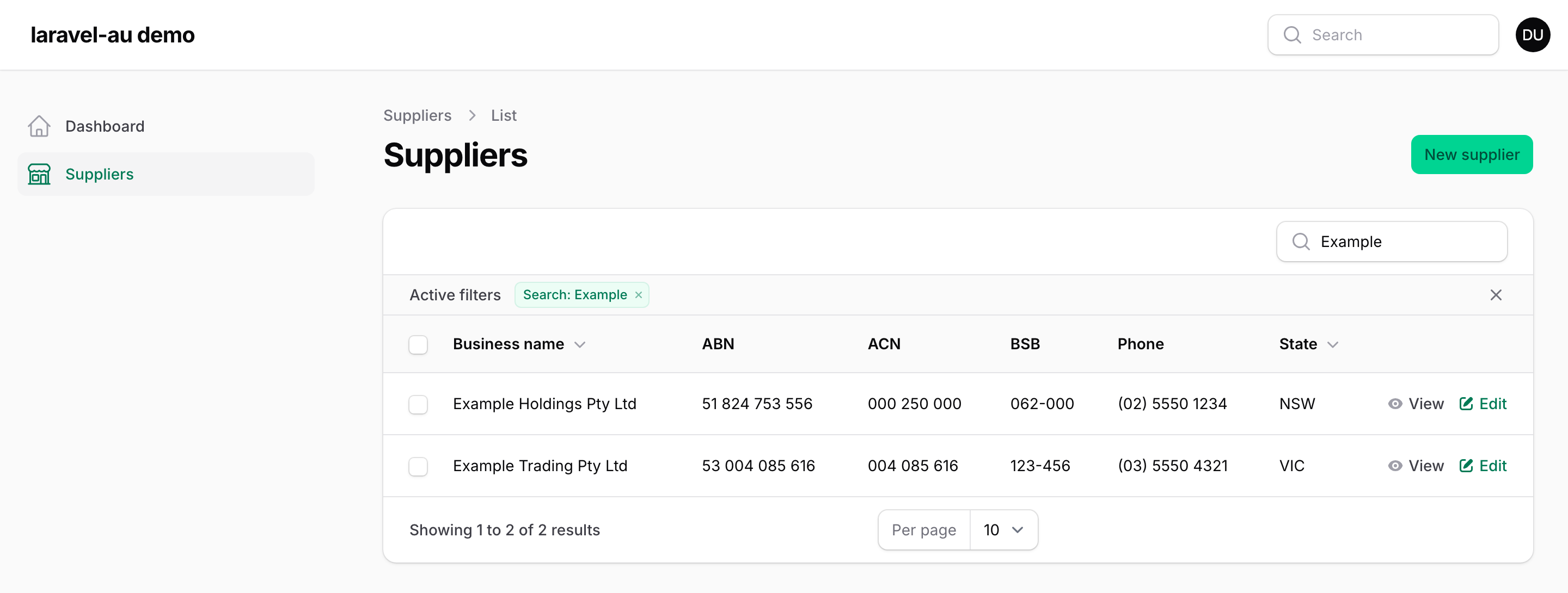
Table columns and infolist entries
These show stored values formatted, to match the form fields. The columns live in
EastpointLabs\LaravelAu\Filament\Tables and the entries in
EastpointLabs\LaravelAu\Filament\Infolists:
| Column | Entry | Example |
|---|---|---|
AbnColumn |
AbnEntry |
51 824 753 556 |
AcnColumn |
AcnEntry |
004 085 616 |
BsbColumn |
BsbEntry |
062-000 |
AuPhoneColumn |
AuPhoneEntry |
0491 570 156 |
StateColumn |
StateEntry |
New South Wales |
use EastpointLabs\LaravelAu\Filament\Tables\AbnColumn;
use EastpointLabs\LaravelAu\Filament\Tables\AuPhoneColumn;
use EastpointLabs\LaravelAu\Filament\Tables\StateColumn;
use Filament\Tables\Table;

public static function table(Table $table): Table
{
    return $table->columns([
        AbnColumn::make('abn')->linkToAbnLookup(),
        AuPhoneColumn::make('phone')->dialable(),
        StateColumn::make('state')->abbreviated(),
    ]);
}
use EastpointLabs\LaravelAu\Filament\Infolists\AbnEntry;
use EastpointLabs\LaravelAu\Filament\Infolists\AcnEntry;
use EastpointLabs\LaravelAu\Filament\Infolists\AuPhoneEntry;
use EastpointLabs\LaravelAu\Filament\Infolists\BsbEntry;
use EastpointLabs\LaravelAu\Filament\Infolists\StateEntry;
use Filament\Schemas\Schema;

public static function infolist(Schema $schema): Schema
{
    return $schema->components([
        AbnEntry::make('abn')->linkToAbnLookup(),
        AcnEntry::make('acn'),
        BsbEntry::make('bsb'),
        AuPhoneEntry::make('phone')->dialable(),
        StateEntry::make('state'),
    ]);
}
Each works with just make(). The value can be a plain stored string, or the value object or
State that an Eloquent cast gives you. A stored value that doesn't parse,
such as an ABN with a bad checksum, is shown as it is, never hidden. Each has the same default
label as its form field, such as "ABN" (see Labels), and ->label() overrides it.
StateColumn and StateEntry show the state's name. ->abbreviated() shows its code, such as
NSW, which suits a narrow column.
->linkToAbnLookup() links an ABN to its page on ABN Lookup, such as
https://abr.business.gov.au/ABN/View?abn=51824753556, in a new tab. It's a public page, so no
GUID is needed. ->dialable() makes a phone number a tel: link, so a click dials it. The link
uses E.164, such as tel:+61491570156, or the national digits for a service number, such as
tel:1300975707, because it has no E.164 form. Links are only built from a valid number, so a
value that doesn't parse gets no link.
Try the demo
The repository includes a small Filament app that uses every field, column and entry, so you can
try them without setting up a project. Its code is in workbench/, and it isn't included when
you install the package. From a clone:
composer install
composer serve
Filament is a dev dependency, so composer install brings it in. composer serve runs
composer build and then starts the server. composer build creates the demo's SQLite
database, migrates it, seeds a demo user and 12 suppliers, and publishes Filament's assets. The
suppliers come from the package's Faker provider.
The panel is at http://127.0.0.1:8000/admin. It signs the demo user in automatically, in the
local environment only. Each composer serve rebuilds the database, so anything you save in the
demo is lost the next time you start it.
Without ABR_GUID, ABN lookup in the demo answers from Abr::fake() with
three test ABNs, 51 824 753 556, 53 004 085 616 and 83 914 571 673, so it works offline.
Type 51 824 753 556 in the ABN field and press Tab: the business name fills in with "Example
Holdings Pty Ltd". With ABR_GUID set, the demo uses the real ABN Lookup service.
New suppliers also go through the active ABN rule when you save. The demo
treats 83 914 571 673 as cancelled, so saving it shows "The ABN must be an active ABN." Saved
suppliers aren't checked again, because the seeded ABNs are generated and may belong to real
businesses.
The address fields check the postcode against the state. With NSW selected, 3000 shows "The
postcode must be in New South Wales."
Roadmap
Ideas for later versions:
- ARBN and ARSN, the numbers for registered bodies and managed investment schemes. They use the same check digit as the ACN.
State::timezone().- An
au:abnArtisan command to look up an ABN from the terminal. - Livewire property synthesisers, so the value objects can be Livewire component properties.
- Livewire components for apps that don't use Filament.
Deliberately excluded
- Tax file numbers. The Privacy (Tax File Number) Rule 2015 limits who can collect TFNs, why, and how they're stored. A TFN rule would make collecting them look routine, so the package doesn't have one.
- BSB directory lookup. AusPayNet licenses the BSB directory, so
Bsbchecks the format only and can't tell you whether a branch exists. - Address autocomplete and postcode-to-suburb data. The data is licensed, and finding an address is a different job from checking one. The postcode checks use public state ranges only.
Testing
composer test     # Pest
composer check    # Pint, PHPStan and Pest, the same as CI
Changelog
See CHANGELOG.md.
Contributing
See CONTRIBUTING.md. Security issues: see SECURITY.md.
Credits
Built by Luke Johnstone at Eastpoint Labs.
Licence
MIT. See LICENSE.md.