laravel-trash-cleaner maintained by omaralalwi
Laravel Trash Cleaner
Laravel Trash Cleaner is a lightweight and powerful utility package that helps you keep your Laravel application clean and performant by:
- 🧹 Deleting debug files (Debugbar, Clockwork) from
storage/. - ⚡ Clearing compiled view caches and frontend build directories.
- 🛠️ Optionally rebuilding frontend assets using tools like
npm,yarn, orpnpm. - ⏰ Optionally scheduling automatic cleanup via Laravel's scheduler.
📋 Table of Contents
- Requirements
- Installation
- Usage
- Configuration
- Scheduling Automatic Cleanup
- Contributing
- Security
- License
- Helpful Open Source Packages
✅ Requirements
- PHP
7.4or8.1+(^7.4 | ^8.1 | ^8.2 | ^8.3 | ^8.4) - Laravel
8.xor higher - A Unix-like environment (Linux/macOS) for
trash:clean-assets, which usesrmand your Node package manager. See the note below.
🚀 Installation
Install the package via Composer:
composer require omaralalwi/laravel-trash-cleaner
🔧 Publish Configuration
Optionally, publish the configuration file to customize paths and build settings (see Configuration):
php artisan vendor:publish --tag=laravel-trash-cleaner
🧹 Usage
🔸 Clean Debug Files
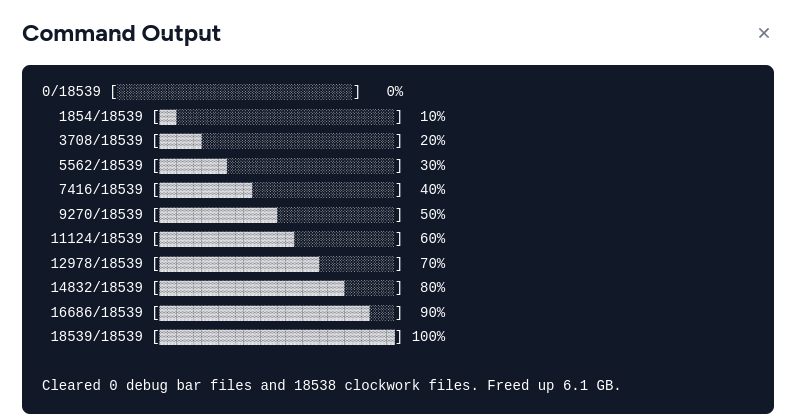
Deletes the .json debug files from the storage/debugbar and storage/clockwork folders with a progress bar, and reports how much disk space was freed:
php artisan trash:clean
🔸 Clean Asset Folders
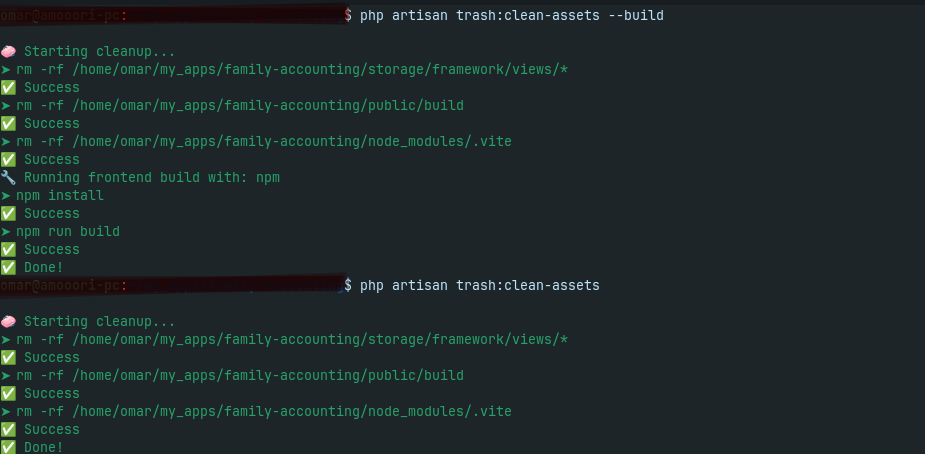
Removes frontend-related build caches and compiled view files based on your config (see cleanup_paths):
php artisan trash:clean-assets
Note:
trash:clean-assetsrunsrm -rfand your Node package manager under the hood, so it is intended for Unix-like environments (Linux/macOS). It is not supported on native Windows shells.
🔸 Clean + Rebuild Frontend (Optional)
Use the --build flag to also run your frontend build steps (npm install && npm run build or equivalent):
php artisan trash:clean-assets --build
This is ideal for resetting the build process after switching branches, clearing corrupted caches, or deploying updates.
⚙️ Configuration
Publish the config file (if you haven't already):
php artisan vendor:publish --tag=laravel-trash-cleaner
This creates config/laravel-trash-cleaner.php:
return [

    // Enable Laravel scheduler integration for `trash:clean` (see Scheduling below).
    'schedule' => false,

    // How often the scheduled cleanup runs. Must be a valid Laravel Schedule
    // frequency method, e.g. 'daily', 'hourly', 'everyFifteenMinutes', 'weekly'.
    'frequency' => 'daily',

    // Paths removed by `trash:clean-assets` (relative to the project root, glob supported).
    'cleanup_paths' => [
        'storage/framework/views/*',
        'public/build',
        'node_modules/.vite',
    ],

    // Node package manager used by the `--build` flag: "npm", "pnpm", or "yarn".
    'package_manager' => 'npm',

    // Commands run (per entry) when `--build` is passed, prefixed by the package manager above.
    // e.g. with npm: `npm install` then `npm run build`.
    'build_commands' => [
        'install',
        'run build',
    ],
];
| Key | Type | Default | Description |
|---|---|---|---|
schedule |
bool |
false |
Auto-schedule trash:clean via Laravel's scheduler. |
frequency |
string |
'daily' |
Any Laravel Schedule frequency method name. |
cleanup_paths |
array |
see above | Paths deleted by trash:clean-assets. |
package_manager |
string |
'npm' |
Node package manager for the --build step. |
build_commands |
array |
['install', 'run build'] |
Commands appended to the package manager when building. |
Tip: If you use
pnpminstead of the defaultnpm, set'package_manager' => 'pnpm'.
⏰ Scheduling Automatic Cleanup
To automate cleanup using Laravel's scheduler:
- Enable it in your config:
'schedule' => true,
'frequency' => 'daily', // any Laravel Schedule frequency method, e.g. 'hourly', 'weekly'
- Ensure Laravel's scheduler is running via cron:
* * * * * cd /path-to-your-project && php artisan schedule:run >> /dev/null 2>&1
Note: Only
trash:clean(debug files) is auto-scheduled. To scheduletrash:clean-assetsas well, register it manually in your application'sroutes/console.php(orapp/Console/Kernel.php):Schedule::command('trash:clean-assets')->weekly();
🤝 Contributing
Contributions are welcome! Please see CONTRIBUTING for details.
🛡️ Security
If you discover any security vulnerabilities, please contact: omaralwi2010@gmail.com
📄 License
Licensed under the MIT License.
📚 Helpful Open Source Packages
-
Lexi Translate simplify managing translations for multilingual Eloquent models with power of morph relationships and caching .
-
Gpdf Open Source HTML to PDF converter for PHP & Laravel Applications, supports Arabic content out-of-the-box and other languages..
-
laravel Taxify Laravel Taxify provides a set of helper functions and classes to simplify tax (VAT) calculations within Laravel applications.
-
laravel Deployer Streamlined Deployment for Laravel and Node.js apps, with Zero-Downtime and various environments and branches.
-
laravel Time Craft simple trait and helper functions that allow you, Effortlessly manage date and time queries in Laravel apps.
-
Laravel Startkit Laravel Admin Dashboard, Admin Template with Frontend Template, for scalable Laravel projects.